The workspace for HoReCa & independent retail

Pick. Order. Done.

Simple supplier ordering for bars, restaurants, cafés, HoReCa venues and independent retailers — plus the invoice control and daily admin tools busy managers actually need. One place instead of paper, email, WhatsApp, Excel and accounting software.

Free supplier ordering · Paid manager tools · Built for real venues

One place for the jobs that slow managers down

Running a venue — or an independent shop — isn't only about serving customers. There are supplier orders to send, invoices to check, missing items to chase, price changes to spot, stock to count and daily tasks to complete. NOPI brings those small-but-important jobs into one simple workspace.

1

Start with ordering

Send supplier orders in seconds and keep a clear record of everything you ordered.

2

Add invoice control

Scan invoices, match them to orders and turn checking into a simple approval flow.

3

Grow into daily ops

Keep track of stock, staff and daily tasks as your venue needs more control.

Ordering that works the way venues and shops work

Set up the products you carry once. After that, ordering is as quick as scanning a barcode — the app pulls up the item, you set the quantity and add it to your order. Build one order across every supplier, confirm it, and send the whole thing in a single tap.

Each supplier automatically receives only their part — delivered straight into their ordering system through our EDI partner DOCURA, or by email if they're not yet integrated.

It's a natural fit for independent retailers too: when you're restocking hundreds of lines, scanning the shelf beats typing every code — and it all still goes out as one confirmed order.

  • Scan a barcode — no typing product names or codes
  • One confirmed order, split and sent to every supplier at once
  • Orders arrive in suppliers' systems via EDI (DOCURA), or by email if not integrated
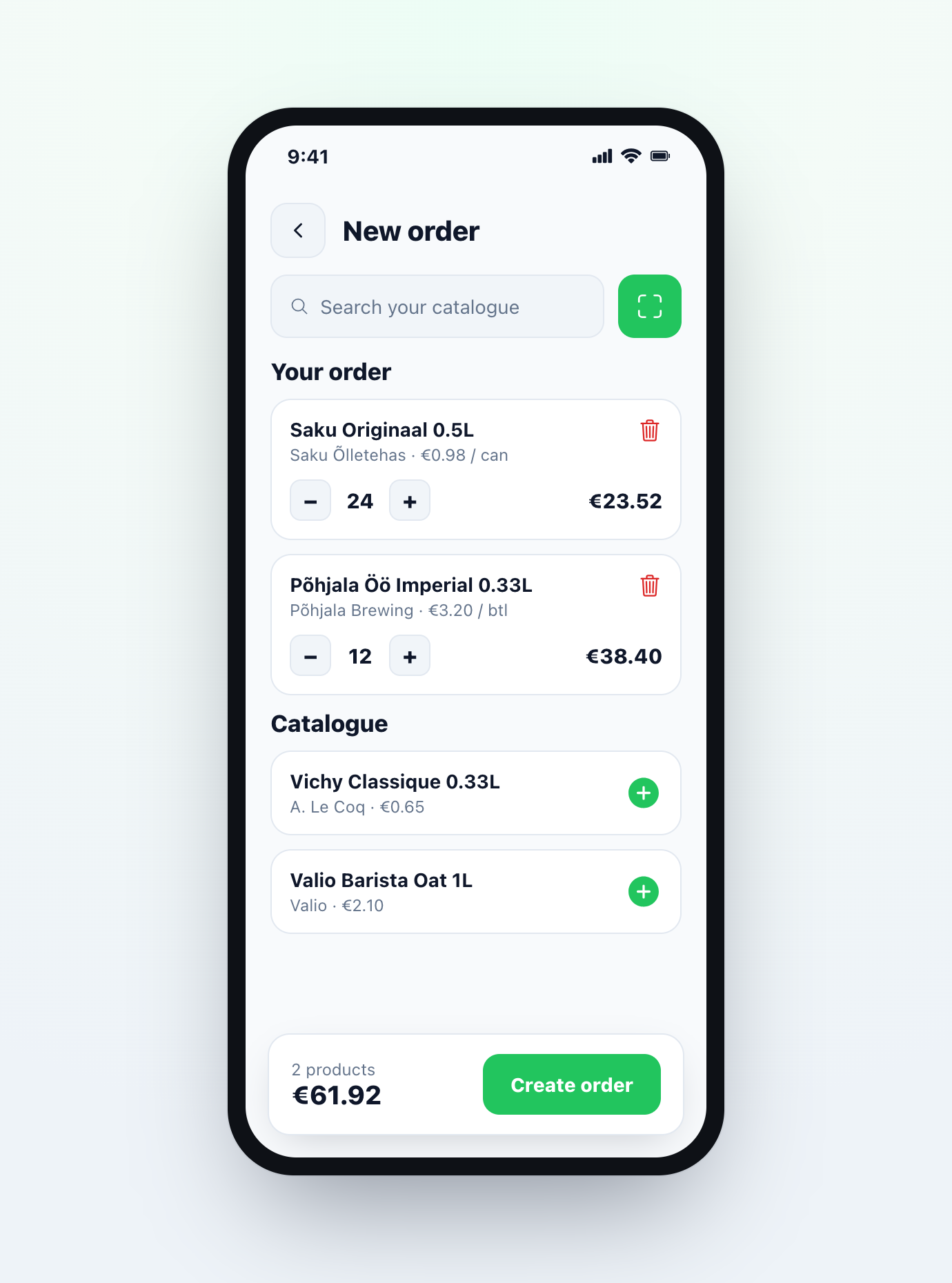
NOPI mobile app — building a supplier order by scanning, with one confirmed order split and sent to every supplier

Invoice control without the paperwork headache

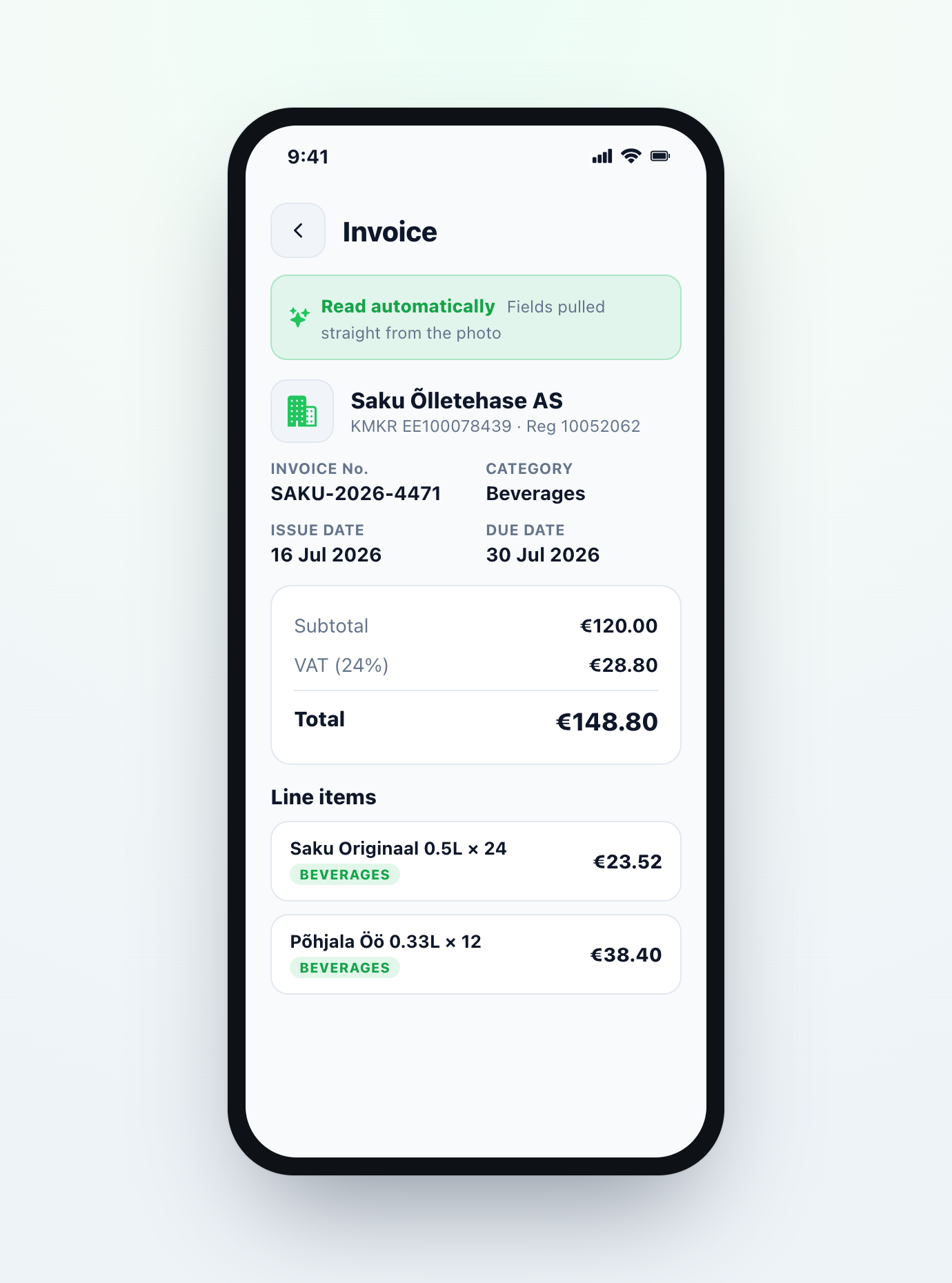
Paper invoices, PDFs and delivery notes are still part of daily HoReCa life. Upload, scan or photograph an invoice and NOPI helps match it against the original order — turning a manual chore into a simple approval flow.

NOPI checks for you

  • Was this item actually ordered?
  • Did the correct quantity arrive?
  • Has the agreed price changed?
  • Is anything missing?
  • Does a credit note need requesting?
  • Is the invoice ready for accounting?
NOPI mobile app — a photographed invoice with its supplier, dates, VAT, total and line items read automatically

Match orders, deliveries and invoices

Scanning an invoice is useful. Connecting it to the order is where the value is. NOPI compares what was ordered, what was delivered and what was charged — so you catch fewer missed errors, forget fewer credits and keep real control over supplier costs.

Ordered Delivered Charged = Matched ✓

The first screen you open each day

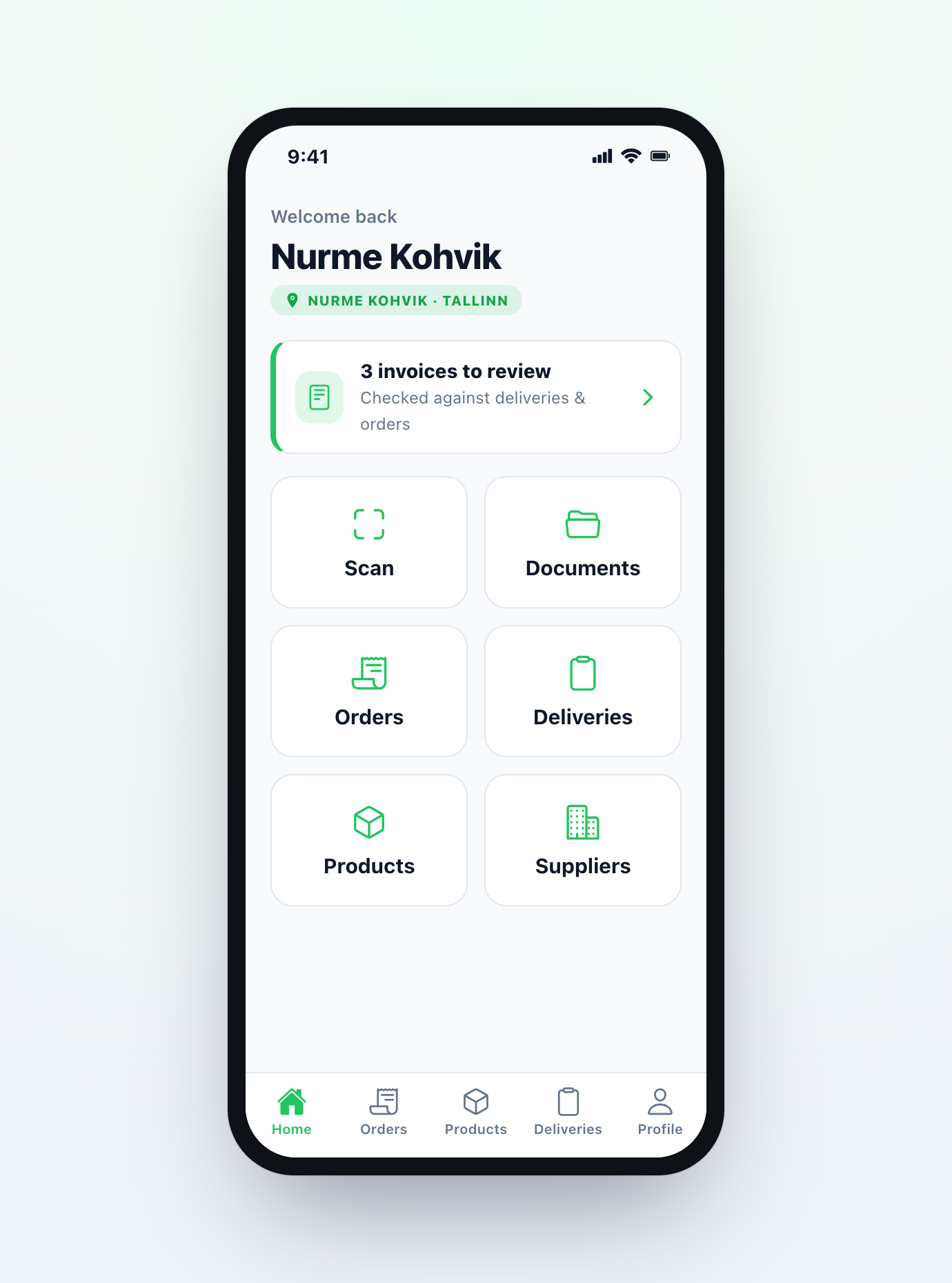
Instead of digging through messages, papers and spreadsheets, the Manager Inbox shows exactly what needs your attention — in one place, ranked by what matters.

  • Invoices waiting for approval
  • Orders not yet confirmed
  • Delivery shortages
  • Price changes
  • Missing credit notes
  • Low-stock items
  • Incomplete checklists
  • Rota gaps
  • Maintenance notes
NOPI mobile app home — the manager inbox showing invoices to review and one-tap access to daily tools

More manager tools, as your venue grows

NOPI isn't trying to replace every big system. It starts with the tools smaller venues actually need — and grows from there.

Simple stock tools

Keep basic product lists, set par levels, count key items and generate suggested orders for what's running low — beers, wines, spirits, mixers, dry goods, packaging and crates.

🗓
Planned

Rota Lite

Weekly rotas, copy last week, availability, time-off and shift-swap requests, a simple labour-cost view and a shareable rota link — without a complicated HR system.

Checklists & logbook

Opening, closing, cleaning, cellar and fridge-temperature checks — plus a manager logbook so important notes don't vanish into chat threads.

Built around accounting

NOPI isn't accounting software — it prepares clean purchase data for it. Once an invoice is approved, export the data and document straight to your accountant.

Less typing. Fewer errors. Cleaner records.

Once an invoice is checked and approved, NOPI hands clean purchase data to your accountant. Exports — CSV, Excel and PDF packs — are available now, with direct integrations to the platforms below on the way.

CSV / Excel PDF invoice packs Merit Aktiva SmartAccounts ERPLY Books Xero QuickBooks + more by request

Free ordering. Paid manager tools.

Start with free supplier ordering. Add the admin tools that save time and reduce mistakes when you're ready.

NOPI Free

Freeforever

For simple supplier ordering.

  • Supplier catalogues
  • Order creation
  • Order history
  • Basic delivery confirmation
  • Supplier communication
Get early access
Planned

NOPI Pro

Comingsoon

For growing & multi-site venues.

  • Stock counts & par-level ordering
  • Suggested orders
  • Rota tools
  • POS & accounting integrations
  • Multi-site reporting
  • Advanced supplier analytics
Join the waitlist

Built for the people who run venues and shops day to day

NOPI is designed around real daily work: ordering, checking, chasing, approving and keeping a hospitality venue — or an independent shop — moving.

Bar managers Restaurant managers Café managers Hotel F&B managers Operations managers Independent venue owners Independent retailers Convenience & grocery stores Specialty & bottle shops Small hospitality groups

Frequently asked questions

Supplier ordering is free — create orders, keep order history and communicate with suppliers at no cost. Venues and shops that want invoice control and daily admin tools can upgrade to NOPI Manager, which comes with a one-month free trial. After that it's a simple monthly subscription or pay-per-use — whichever suits you.

No. NOPI works for any supplier you order from — food, drinks, packaging, cleaning, consumables and more. It's just as useful for independent retailers carrying hundreds of lines who want to automate repetitive, high-volume ordering. Invoice control isn't limited to drinks suppliers either.

No — NOPI is built around accounting, not instead of it. Direct integrations (Xero, QuickBooks, Merit Aktiva, SmartAccounts, ERPLY Books and more) are still being built, so to begin with the best option is a clean export — CSV, Excel or a PDF invoice pack — that drops straight into your accountant's workflow.

Yes — NOPI is a native mobile app. Download it from the App Store (iOS) or Google Play (Android) to scan barcodes, build and send orders, scan invoices and clear your inbox from anywhere. A desktop view is there for when you want a bigger screen.

Upload, scan or photograph an invoice and NOPI matches it against the original order — flagging wrong quantities, price changes, missing items and credits to request. You approve with a couple of taps.

Ordering and invoice control come first. Stock tools, Rota Lite, multi-site reporting and deeper integrations are planned for NOPI Pro — join the early-access list to help shape the order we build them in.

Less admin. More control.

One app for supplier ordering. One place for invoices and delivery issues. One simple view of what needs attention. Join the venues getting early access to NOPI.

nopı — pick, order, done.